


Barber Salon Launcher
2.9105.00 Reviews
App Specs
- Version
- 1.0.5
- Updated On
- License
- Free
- Downloads
- 1,000,000+
- Developer
- Gamnest
- Categories
- Personalization
- Platform
- Android
Screenshots
 Analysis by AppCompare
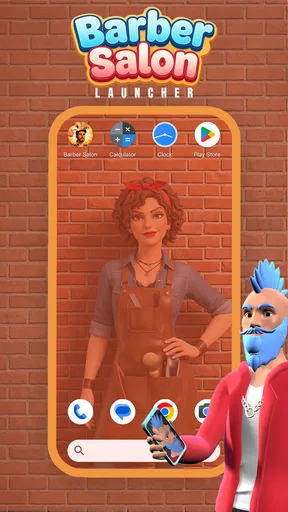
I like the idea behind Barber Salon Launcher, but I’d judge it less as a makeover in itself and more as a themed way to make everyday phone navigation feel personal. Its barber-inspired look gives the home screen a distinct identity, while the familiar launcher controls keep the change approachable. That balance is the main reason I’d recommend trying it: it offers room to play with your layout without asking you to learn an entirely new way to use your phone.
Who will enjoy a barber-themed home screen
This is a personalization app from Gamnest, and its appeal is clearest if you enjoy matching your phone’s appearance to a particular mood or interest. The salon styling gives the icons and interface a coherent visual direction rather than leaving you to assemble a look from unrelated wallpapers and icon packs. I’d especially suggest it to someone who likes tweaking a home screen for fun, or who wants a more noticeable theme than a simple background change.
It is also an easy option for a casual user who wants to experiment without first learning the ins and outs of Android customization. The app is free, is rated for Everyone, and has a 4.3 average from around 8,300 ratings. It has passed a million installs, which makes it a familiar choice in its niche, though popularity alone does not tell you whether its style will suit your taste. The current version is 1.0.3, and it runs on Android 8.0 or newer.
What makes the customization useful
The strongest part of the experience is the way the theme can be carried through several parts of the home screen. Changing icon shapes and themes lets you adjust the overall feel, while matching clock and weather widgets can make the layout look more deliberate. I find that kind of consistency more satisfying than changing one element and leaving everything else visually disconnected.
A practical tip is to start with the layout you already use rather than rebuilding every screen at once. Keep your most-used apps easy to reach, then adjust the icons and widgets around them. That gives you a chance to decide whether the barber styling works in daily use, not just while you are browsing options. It also saves time if you decide you prefer a simpler arrangement.
The ability to rename app labels is another small but distinctive touch. I’d treat it as a playful customization rather than a productivity feature: barber-inspired names can make a themed screen feel more complete, but unfamiliar labels may slow you down when you are trying to open something quickly. If you try this, I’d rename only a few less-critical shortcuts first and keep essential apps recognizable.
A useful test for real-world use
Imagine setting up your phone before a busy morning. You want the weather at a glance, a clear route to messages and calls, and a home screen that feels more personal than the default one. A matching widget and a restrained set of themed icons can make that setup feel considered without turning it into a project. If you have several screens, different wallpapers can help distinguish them—for example, keeping one screen practical and another more decorative.
Worth Reading Before You Choose

Switching to Android Auto Means Rethinking Your Driving Routine

Google Calendar Makes a Crowded Week Easier to Manage

Baby Panda World Brings Quick Play to Modern Phones, but Its Game Library Feels Busy

ESPN’s Live Game View Makes Following Close Games Easier

QuizzLand Review: A Good Fit for Short Trivia Breaks, Not Every Player

Basketball Stars: Multiplayer Is Fast, but Can It Recover When Matches Go Wrong?
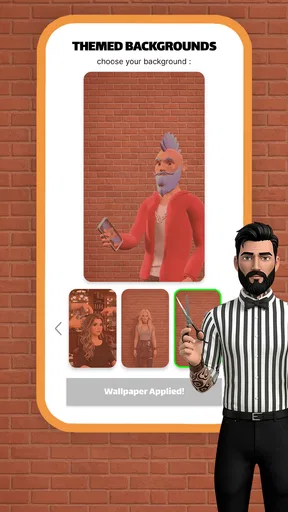
That same flexibility can become a trade-off. Different backgrounds on every screen may look lively while you are swiping through them, but too much variation can make the phone feel less unified. I’d use separate wallpapers only when they serve a purpose, such as visually separating a work-oriented screen from a page of personal shortcuts. A consistent palette usually makes the theme easier to live with than changing everything just because the option is available.
How it compares with other ways to personalize
Compared with changing only your wallpaper, a launcher gives you a broader visual refresh: icons, widgets, labels, and screen backgrounds can work together. That makes Barber Salon Launcher a better fit if you want a recognizable barber-shop look rather than a single decorative image. On the other hand, someone who only wants a new background may find a full launcher more change than they need.
It also differs from building a custom home screen from separate icon packs, widgets, and wallpaper choices. That piecemeal route can offer more control for someone who enjoys fine-tuning every detail, but it takes more effort to make the pieces match. This app’s themed approach is more appealing when convenience and a coherent visual style matter more than unrestricted design freedom. I’d choose a more general-purpose customization setup if I wanted a neutral look, a very specific personal design, or a screen optimized around work rather than a salon theme.
Where the experience may not fit
A barber theme is a strong visual choice, so it will not be for everyone. If you prefer minimal icons, understated colors, or a home screen that blends into the phone’s default design, the salon-inspired treatment may feel too specific. The same goes for anyone who values function over decoration and has no interest in adjusting icons, widgets, or labels.
There is also a difference between a smooth first impression and a guarantee that every device or personal setup will feel identical. A launcher changes the part of Android you interact with most, so I’d take a few minutes to check that your usual habits still work for you after applying the look. Try finding your most-used apps, checking the widgets, and moving between screens before committing to a larger redesign. If the theme makes common tasks harder to scan, simplify the layout rather than forcing yourself to keep every decorative element.
Barber Salon Launcher is aimed at Android users: its minimum operating-system requirement is Android 8.0. If you use a different platform, this is not the right route for changing that device’s home screen. For eligible Android phones, the sensible question is whether you want a themed launcher at all—not merely whether you can install one.
People often want to know whether they need to be a barber or grooming enthusiast to enjoy it. I don’t think so; the theme can appeal simply because it is visually distinctive. But if barber-shop imagery does not interest you, its central style is unlikely to become more appealing just because the customization is easy to access. The most important choice is whether you like seeing that look every time you reach for your phone.
It is also worth separating customization from practical organization. Renaming shortcuts and assigning wallpapers can make the phone feel more personal, but they do not automatically make it easier to use. I’d make changes in small batches and keep the names of essential apps familiar. That way, the visual experiment remains reversible in spirit: you can tell which choices help and which are only decorative.
Trying the theme without overhauling your phone
When I first opened the Barber Salon Launcher, I was greeted with a sleek, barber-themed interface. It was like stepping into a virtual barber shop, complete with all the bells and whistles. The graphics are clean, and the layout is intuitive, which is a big win in my book. I mean, who doesn't love a user-friendly app, right?
The app's theme is all about style and sophistication. The colors are bold, yet not overwhelming, and the icons are designed to resemble barber tools and accessories. It’s like having a mini grooming session every time you unlock your phone.
Customization Galore
One of the standout features is the customization options. You can tweak almost every aspect to match your personal style. From changing the icon shapes to selecting different themes, the possibilities are endless. I spent a good hour just playing around with different looks for my home screen. It’s like dressing up, but for your phone!
Another cool feature is the widget customization. You can add clock and weather widgets that are styled to match the barber theme. It’s a small touch, but it really ties the whole look together. Plus, the transition effects when switching between screens are smooth and add a touch of elegance.
Performance and Usability
Now, I know what you’re thinking. Does all this style slow down the phone? Surprisingly, no! The Barber Salon Launcher is optimized to ensure smooth performance. I didn’t experience any lag or crashes, which is a huge plus. It’s a bummer when a launcher looks great but ends up being a resource hog.
Navigating through the app is a breeze. The menus are straightforward, and the settings are easy to find. If you’re not tech-savvy, don’t worry! The app includes a small guide to help you get started, which is a nice touch for beginners.
A Personal Touch
One of the features that caught my attention was the ability to customize app labels. You can rename apps to whatever suits your mood or style. I had a bit of fun renaming my apps to barber-inspired names. It’s these little personal touches that make the app feel unique.
There’s also a feature where you can set different wallpapers for each screen. This might be overkill for some, but I found it added a nice variety and kept things fresh every time I swiped through my screens.
A considered recommendation
In conclusion, the Barber Salon Launcher is more than just a visual upgrade for your phone; it’s a complete transformation. It’s perfect for anyone looking to add a bit of flair and personality to their device without sacrificing performance. Whether you’re a barber shop enthusiast or just someone who loves a good theme, this launcher is definitely worth a try.
So, if you’re ready to give your phone a stylish makeover, head over to the app store and check it out. Trust me, your phone will thank you!
Pros
- Intuitive interface for easy navigation.
- Customizable themes to suit your style.
- Smooth performance with minimal lag.
- Wide range of barber-related icons.
- Regular updates with new features.
Cons
- Limited free features without purchase.
- Some themes lack originality.
- Occasional ads can be intrusive.
- Initial setup can be time-consuming.
- Limited support for older devices.
FAQs for Barber Salon Launcher
What features does Barber Salon Launcher offer to users?
Barber Salon Launcher provides a sleek interface with customizable themes tailored to barbershop aesthetics. Users can access unique icons, wallpapers, and widgets that enhance their device's look. Additionally, the app includes appointment scheduling, client management tools, and a gallery for showcasing hairstyles, making it a comprehensive tool for professionals.
Is Barber Salon Launcher free to download and use?
The basic version of Barber Salon Launcher is free to download, offering a wide range of features to enhance your device. However, there are premium options available through in-app purchases. These include exclusive themes, additional customization options, and advanced client management tools to further enhance the user experience.
Does Barber Salon Launcher require any special permissions?
Yes, Barber Salon Launcher requires several permissions to function effectively. These include access to your calendar for scheduling appointments, storage for saving themes and client photos, and internet access for updates. It's important to review these permissions to ensure they align with your privacy preferences before downloading the app.
Can Barber Salon Launcher be used for personal purposes, or is it only for professionals?
While Barber Salon Launcher is designed with barbershop professionals in mind, its customizable themes and aesthetic appeal make it suitable for personal use as well. Anyone looking to give their device a unique barbershop-inspired look can enjoy the app's features, though professionals will benefit most from its client management tools.
How user-friendly is Barber Salon Launcher for beginners?
Barber Salon Launcher is designed to be user-friendly, with an intuitive interface that guides users through setup and customization. Beginners can easily navigate through the app's features, with helpful tutorials and customer support available if needed. Its simple layout ensures that even those new to launchers can enjoy a seamless experience.


